Explore

Loading

Monday, February 25, 2013

Mozilla to launch Firefox OS phones in July


Mozilla to launch Firefox OS phones in July

SAN FRANCISCO: Mozilla, makers of the popular Firefox internet browser, is preparing to challenge Google and Apple's grip on smartphone software.

A new Firefox operating system for mobile devices is set for a July release after winning the backing of 13 wireless service providers around the globe, including Spain's Telefonica, China Unicom and America Movil.

Mozilla is betting there's room for a software developer-friendly mobile platform alongside Apple's and Google's Android, which together power the majority of mobile devices on the planet.

The new software is based on open web standards and is capable of operating on devices with much lower hardware requirements than today's existing crop of smartphones, according to Mozilla.

Because the Firefox OS is open-source and web-based, third-party developers will be free to sell mobile applications without needing to share revenue with Apple or Google.

"There's a strategic imperative for the industry to have another OS that really is open and supports choice and competition," said Mozilla's senior vice president of products, Jay Sullivan.

Mozilla will showcase some of the first hardware devices based on that software at the Mobile World Congress, taking place in Barcelona this week. Among the brands that have signed on to make devices based on Firefox OS are South Korea's LG , China's ZTE and Huawei.

Unlike Google and Apple's operating systems, which are built from proprietary technology, Firefox OS uses the HTML5 standard that web services are built with. That means anyone familiar with web programming can create Firefox OS apps.

Whether a smartphone built on web standards can deliver the kind of performance that consumers expect remains to be seen. Facebook famously stopped using HTML5 to develop its iPhone app last year, with chief executive Mark Zuckerberg saying the technology couldn't deliver acceptable quality and calling a decision to use HTML5 for its app one of Facebook's "biggest mistakes." 


Source:http://timesofindia.indiatimes.com/tech/tech-news/hardware/Mozilla-to-launch-Firefox-OS-phones-in-July/articleshow/18671149.cms

Sunday, February 24, 2013

Manjaro Linux, a brand-new distro on the rise


With virtually countless Linux distributions available for every taste and purpose, it's no secret that choice is a defining feature of the Linux world. What's not always apparent, though, is that the range of choices actually gets bigger every year.
New distros come onto the scene on a fairly regular basis; SolusOS and Fuduntu Linux are two I've covered over the past few months, but recently another one caught my eye as being particularly worth covering.
It's Manjaro Linux, a brand-new contender that launched last August and has already sprinted up DistroWatch's page-hit rankings to No. 15. Why all the interest? The project has released a few key updates this month. Here's a rundown of some of the distro's best features.
1. Based on Arch Linux
Arch Linux is a very popular distro among more experienced users in the Linux community, and it's renowned for its simplicity, power, and speed.
I recently covered Cinnarch, which adds the Cinnamon desktop to this longtime favorite, but now Manjaro presents another option.
“Manjaro provides all the benefits of the Arch operating system combined with a focus on user-friendliness and accessibility,” the project team explains. “Available in both 32 and 64 bit versions, Manjaro is suitable for newcomers as well as experienced Linux users.”
2. User-friendly yet powerful
Manjaro strives to preserve the power of Arch Linux for enthusiasts while also making it more accessible for newcomers to Linux.
Targeting the latter group, the distro includes a user-friendly installer and is designed to work fully “straight out of the box,” its makers say. Toward that end, it also includes preinstalled desktop environments, automatic hardware detection and driver installation, multimedia codecs, and graphical applications for installing software and updating the system.
For those on the more experienced end, however, Manjaro offers extensive customizability to suit personal taste and preference. In addition, there's also a minimalist NET-Edition stripped of any preinstalled software that can be used as a base installation on which to build your own system.
“Starting from a command line, be completely free to chose your own greeters, desktops, hardware drivers, software applications, and so on!” the project team explains.
3. Numerous desktop options
Though the lightweight Xfce desktop environment comes standard in Manjaro, the software also offers Cinnamon, KDE, and OpenBox options as well as E17, MATE, and LXDE through what it calls “Community Editions.”
4 . Rolling releases
Like Arch, Manjaro uses a rolling release development model. What that means is that users always have the most up-to-date system possible, without the hassle of having to formally install new versions. When new releases are announced, they're simply up-to-date snapshots of the latest software.
5. A world of software
As a fully Arch-compatible distro, Manjaro does offer its users access to the Arch User Repository and all the software packages contained therein.
In addition, however, Manjaro also offers its own official repositories “in order to ensure that any software packages provided (e.g. system updates and applications) have been fully tested and are completely stable before release,” it notes.


 It's available for download in the flavor of your choice. 

Source:http://www.pcworld.com/article/2029179/meet-manjaro-linux-a-brand-new-distro-on-the-rise.html

Ubuntu Linux Operating System Released for Google Nexus 7, Nexus 10


If you've been wishing your Google Nexus tablet could run the Ubuntu version of Linux, your wish has been granted.  A preview version of Ubuntu Touch can now be downloaded from Canonical.
Ubuntu for TabletsThere are a couple of cavets, though. First off, this version is only for the Google Nexus 7 and Nexus 10. The goal is to eventually bring support to all devices that currently run Android, but that's still quite a ways away.
Also, Canonical assumes that anyone who wants to try out an Ubuntu tablet is already running a desktop with this same operating system, and is familiar with using terminal coomands. This process is not for timid Linux newbies.
Instructions for downloading Ubuntu Touch Preview can be found on Canonical's web site.
More about Ubuntu Touch
Ubuntu Touch will run on Nexus smartphones as well as tablets, and integration across these two typpes of mobile device is one of the hallmarks of this version. Users will be able to run a tablet and an smartphone app side-by-side, and drag-and-drop content between the two.
The Nexus tablets do not have many hardware buttons, and this operating system has been designed to not need them, as the four edges of the screen are used to navigate between apps, settings, and controls.
Ubuntu Touch offers multiple secure user accounts, plus a guest account, allowing a family to share one device, or for one to be shared by employees at an office.
For the security conscious, Canonical promises that data protection is "world class" with full disk encryption, and additional encryption for personal data.
Users will be able to add a keyboard and mouse to turn their Ubuntu tablet into a laptop.
Ubuntu is able run HTML5 software as well as native apps. And Canonical says it supports remote-access over standard protocols from Microsoft, Citrix, VMware and Wyse.

SOURCE:http://www.tabletpcreview.com/default.asp?newsID=3873&news=Canonical_Ubuntu_Touch_for_Tablets_Released

Wednesday, February 20, 2013

Tizen 2.0 Linux Based Smartphone And Tablet OS Source Code Released


 Developers of the Tizen 2.0 Linux based operating system designed for smartphones and tablets, has released the open source software of Tizen 2.0 together with a software developer kit.
The Tizen 2.0 operating system and SDK now includes new APIs that developers can use to access Bluetooth and NFC features on smartphones equipped with the services.


Tizen 2
 Tizen 2.0 represents a major milestone for software developers and device vendors. We encourage you to download the new SDK, and let us know what you think of it after you have installed and used it. This release includes many new features and improvements over Tizen 1.0 released in April, and Tizen 2.0 alpha in September, 2012. As a Tizen 2.0 developer, you will find strong HTML5/W3C APIs and a new native framework. 

Highlights of this release include:

- Enhanced Web framework that provides state-of-the-art HTML5/W3C API support
- Web UI framework, including full-screen and multi-window support
- Additional Tizen device APIs, such as Bluetooth and NFC support, and access to the device’s calendar, call history, and messaging subsystems
- Web Runtime framework supporting new configuration elements for specifying the required features and privileges, and providing the basic runtime environment for NPRuntime -plugins
- Native framework supporting full-featured application development and providing a variety of features such as background applications, IP Push, and TTS (Text-To-Speech)
- Core and native reference applications including Calendar, Contacts, Gallery, Phone, Settings, and Video Player
- Enhanced Web IDE providing WYSIWYG design environment, Chrome-based JavaScript inspector, and JavaScript log viewer
- Native IDE providing a project wizard, WYSIWYG design environment, unit test tool, and dynamic analyzer


Source: http://www.geeky-gadgets.com/tizen-2-0-linux-based-smartphone-and-tablet-os-source-code-released-19-02-2013/

What's new in Linux 3.8

"Unicycling Gorilla" is the code name for Linux 3.8


Graphics

In Linux 3.8, the Nouveau kernel driver will include everything that the OpenGL driver – which is part of current versions of Mesa 3D and is also called Nouveau – needs to use the 3D acceleration of all GeForce graphics chips available so far, without further configuration. This is the first time that the Nouveau developers, who use reverse engineering to get the information they need to program their drivers, have managed this feat; before this, they were still lacking standard 3D support for some newer Fermi GPUs and the Kepler graphics chips, which have been on the market since March 2012 (1, 2, 3). For many computers, however, NVIDIA's proprietary graphics driver will still be a better choice, since Nouveau can't activate the faster operation modes for many of the newer GeForce chips, resulting in 3D performance that leaves something to be desired. There are also other issues, particularly when it comes to video acceleration and fan management support.
The i915 graphics driver now supports by default the graphics cores of the Haswell processors that Intel will introduce under the name Core i4000 in a few months. The developers have also included a workaround for a bug in the Intel 830 and 845 chipsets so the graphics drivers are supposed to be stable on these chipsets.


F2FS

Linux now supports F2FS (Flash-Friendly File System), a filesystem that was introduced by Samsung developers in October. It is designed for flash storage media that uses a more basic Flash Translation Layer (FTL) than SSDs for desktop PCs and servers – for example USB flash drives, memory cards and the storage media that is used in cameras, tablets and smartphones.
F2FS is a Log-structured File System (LFS) and progressively fills up storage media from the beginning; only once it has reached the end will it return to the beginning and use any areas that may have been deallocated in the meantime. Like Btrfs, F2FS uses Copy-on-Write (COW) to sequentially fill storage devices; this provides a certain robustness. Unlike Btrfs and Ext4, F2FS does not attempt to prevent data fragmentation; very short access times mean that fragmentation is not an issue with flash storage media. The userspace tools for formatting F2FS drives are available at kernel.org. 

Btrfs and Ext4

Btrfs, which continues to be classified as experimental, now includes a "replace" feature that can transfer data from one drive to another faster than before – for example, before replacing a disk (1, 2). Other Btrfs changes include some that are designed to reduce latencies and CPU loads when calling fsync or writing data via O_DIRECT; further patches allow Btrfs to better distribute loads across multiple CPUs, which is said to improve performance (1, 2).
The new Inline Data Support feature allows Ext4 to store files that only consist of a few bytes together with the inode to save storage space and accelerate access (1, 2). Ext4 now also supports the SEEK_DATA and SEEK_HOLE lseek options that were introduced in Linux 3.1 and allow programs such as backup or copy tools to detect, and omit, empty areas in sparse files. Tmpfs now implements these lseek options as well.

Networking

The Berkeley packet filter (BPF), used by sniffer tools such as tcpdump, can now be used to filter VLAN tags. The rtl8723ae driver for the Realtek RTL8723AE PCIe WLAN chip is new (1, 2 and others). The brcmsmac WLAN driver now supports the BCM43224 Broadcom chip, while the rt2800usb RaLink driver supports the Sweex LW323 USB WLAN adapter. The cdc-mbim driver, which supports broadband modems that implement Mobile Broadband Interface Model (MBIM) 1.0, specified by the USB Implementers Forum, is also new (1, 2). MBIM is a USB protocol for connecting modems for laptops, tablets and desktop computers that provide an internet connection using GSM and CDMA-based 3G and 4G (including LTE).

Drivers

The kernel's audio drivers now support the Philips PSC724 Ultimate Edge sound card. The kernel can also handle VIA's VT1705CF HD audio codec now. Another addition is the mpt3sas "LSI MPT Fusion SAS 3.0 Device Driver" that supports 12GB SAS chips by LSI; it shares some features with the mpt2sas driver that has been put into maintenance mode. The hptiop driver can now address HighPoint RR4520 and RR4522 controllers. The kernel developers have marked the uas driver, which handles the USB Attached SCSI protocol, as broken because it causes problems and is not yet ready for the major distributions.

Infrastructure

Following a lengthy, sometimes heated dispute between various kernel developers, a number of enhancements developed under the "balancenuma" umbrella have been merged into Linux 3.8 (1, 2, 3, 4, 5 and others). In the ideal case, these improvements will enable the kernel to automatically maintain coherence between the processor and memory for a single process. This kind of setup is important for optimising performance on multiprocessor systems which utilise the now widely used NUMA (non-uniform memory access), as processes on NUMA systems can access memory allocated to the processor on which they are running faster than they can access memory allocated to other processors.

Architecture


To simplify maintenance and ongoing development, the kernel developers have removed support for Intel 386 CPUs and other CPUs that make use of the architecture which was extremely widespread more than 20 years ago. 486 and newer x86-32 processors will continue to be supported. It was on a 386 that Torvalds first started developing Linux, but he will not be shedding any tears for the code, commenting: "I'm not sentimental. Good riddance."

Virtualisation

A balloon driver for Hyper-V has been merged into the kernel. The Microsoft hypervisor can, at runtime, temporarily transfer memory from Linux guests running this driver to the host and subsequently return it.
Linux 3.8 more or less completes the major restructuring around user namespaces, driven forward over the last few months by Eric W. Biederman. These changes will enable non-privileged users to create an isolated space within which they will have root privileges. Within this space, however users will not be able to do anything which would require privileged actions to be taken outside of the namespace.

Resource controls

The kmem extension has been added to the memory cgroup controller (1, 2 and others, documentation). It can be used to limit the amount of memory required by the kernel for managing processes. Using appropriately configured limits, this should enable the kernel to keep the lid on fork bombs even within containers.


Sunday, January 20, 2013

OpenSUSE 12.3 beta is ready to run


Back in 2012, openSUSE, SUSE's community Linux distribution, wasn't looking so good. The project  was missing deadlines and had to be completely reorganized. Eventually, openSUSE 12.2 appearedin September, and since then openSUSE seems to have been on the right track. At the least, openSUSE is on time for the first, and only, beta of its next release, openSUSE 12.3.
OpenSUSE may not get the ink Fedora, Mint, or Ubuntu Linux do, but its parent Linux distribution, SUSE Linux Enterprise Server (SLES) is still one of the major server Linux distributions. Linux professionals know you ignore openSUSE and SUSE at your own risk.
OpenSUSE is also the one major distribution that has stayed true to the KDE desktop environment, instead of GNOME or one of the many GNOME desktop spin-offs such as Cinnamon and MATE. This beta uses the KDE 4.10 RC2 of KDE workspaces and applications.
The final release of KDE 4.10 is set for the first week of February. Thus, when openSUSE 12.3 goes final, it will ship with KDE 4.10.
It's not all KDE though. OpenSUSE is incorporating tools from other desktops as well. For example, the XFCE file manager Thunar is included. This features tab support, improved bookmark handling and a check for free space before copying starts. OpenSUSE also includes LXDE's respected PCMan file-manager.
Under the hood, openSUSE will be using the 3.7.1 Linux kernel. The most significant improvements here are in networking. 3.7 incorporates TCP Fast Open, which can speed opening up Web pages from 10 to 40%. It also includes Server Messenge Block (SMB2) protocol for Windows PC file support.
This kernel also does a great job of supporting ARM processors. This leaves the door open for easily porting openSUSE to ARM-powered systems such as the ARM-based Samsung Chromebook. Indeed there are earlier openSUSE builds for the Chromebook are already available.
As for applications, besides the KDE family, openSUSE 12.3 will ship with LibreOffice 3.6 for word processors and Firefox 18 for Web browsing.

Download OpenSUSE 12.3
http://software.opensuse.org/developer/en

Source: http://www.zdnet.com/opensuse-12-3-beta-is-ready-to-run-7000010017/

Sunday, January 13, 2013

Top 5 reasons the Ubuntu Linux phone might make it


5) Ubuntu Unity interface

Even at its very early stages Unity on the phone is the sweetest smartphone interface I'd ever seen. I've always known Ubuntu's default interface, Unity, was really meant for touch interfaces, now that I've seen it on a phone it really shows to its best advantage.
According to Bacon, you'll have the chance to install it and see it for yourself on Galaxy Nexus phones beginning in March. There have been other reports that the first Ubuntu for phones installation images will appear in February, but March is much more likely.

4) Easy Smartphone OS Upgradability

Shuttleworth pointed out to me, unlike Android, where the version you get is what you usually are stuck with for forever and a day, Ubuntu on phones, just like on the desktop, will be constantly upgraded. For frustrated Android smartphone geeks who always want the newest version they'll feel like they died and went to heaven.
Bacon added though that Ubuntu for phone won't be using same release model as Ubuntu desktop. There won't be one universal image that can be used on all phones. Each phone model will need its own image to make the best possible use of its hardware.

3) Easy Carrier Customization

At the same time, however, carriers will be able to easily customize the phone interface and add their own apps. So, how can it be both easy for end-users to upgrade to the latest version and at the same time let carriers add in their applications and particular look and feel? Easy. By keeping the carrier optimizations in user space, where it's easy to change things, and out of the core operating system itself. This could be the best of both world for end-users and carriers.

2) Linux Desktop Software Compatibility

I had been worried about getting software developers to give Ubuntu a try. I mean there's already so much money to be made in Android and iOS and there's only so many embedded programmers to go around. Bacon made me realize though that all existing Ubuntu applications—LibreOffice, Gimp, Rhythmbox, etc.--will all run on Ubuntu phones. Now getting them to display properly on the phone's interface will take some work, but that's the easy part. The core functionality of tens of thousands of Linux apps will already be available. Of course, if you use your Ubuntu smartphone to power up a PC display you won't even need that.
To make it easier for existing Linux programmers to bring their desktop apps to the phone, Bacon said Ubuntu is working on providing programmers with QML (Qt Meta Language) widgets for quick interface development. QML, along with HTML5 and OpenGL, is native to Ubuntu on phones. These, and the software development kit (SDK), said Bacon, should be out in March.
What all this means is that every Linux programmer out there can also be a smartphone programmer. Almost a thousand developers, said Bacon, are already working on Ubuntu phone apps. Bottom line: Ubuntu is going to have thousands of apps. ready to go before it ships.

1) Green Fields and High End Markets

Shuttleworth also observed that Ubuntu gives carriers two models. In the first, they can cheaply add Ubuntu to low-end phones. This may not matter much in the power-hungry first-world countries, but Shuttleworth believes this makes Ubuntu ideal for second and third-world countries.
In the second high-end model, users will be able to use top-of-the-line Ubuntu smartphones both as a phone and as a desktop. Does the idea of using a smartphone to power your desktop sound silly to you? It shouldn't.
Tablets are already doing it and, as Shawn Dubravac, CEA's Chief Economist and Senior. Director of Research observed at CES said, "65% of the time we spend on mobile phones is not communications. Even adding in e-mail, texting, and so on, smartphones are no longer about communication." Shuttleworth and company are just taking the smartphone to its next natural evolutionary step.

Source:http://www.zdnet.com/top-5-reasons-the-ubuntu-linux-phone-might-make-it-7000009721/

Friday, January 11, 2013

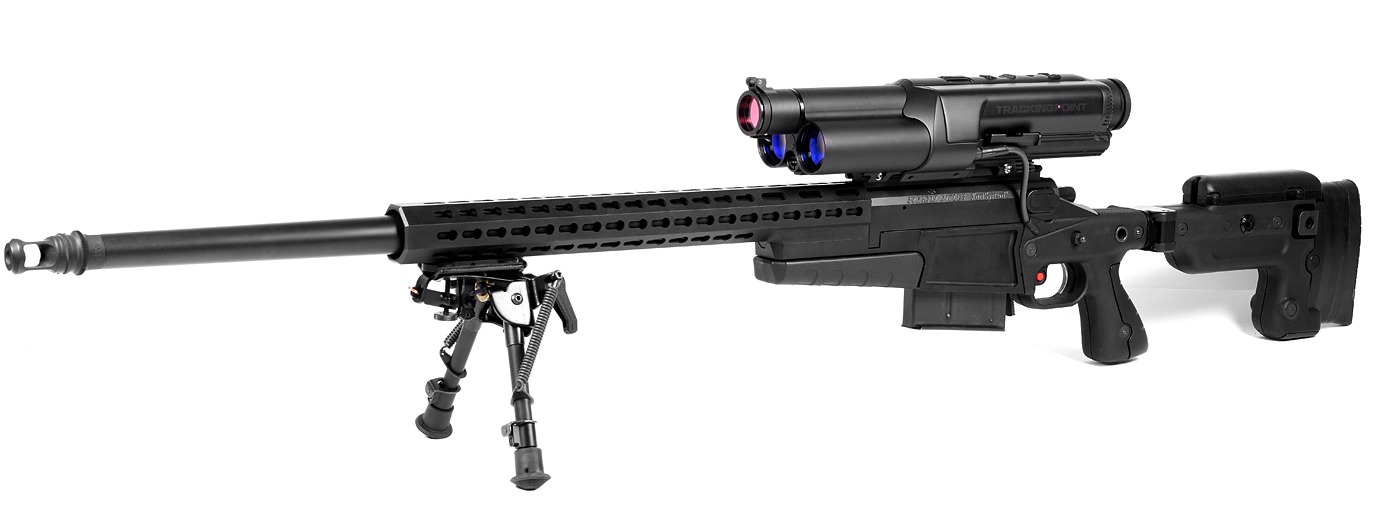
Linux-powered rifle brings “auto-aim” to the real world


CES is about technology of all kinds; while we're busy covering cameras, TVs, and CPUs, there's a huge number of products that fall outside our normal coverage. Austin-based startup TrackingPoint isn't typical Ars fare, but its use of technology to enable getting just the perfect shot was intriguing enough to get me to stop by and take a look at the company's products.
TrackingPoint makes "Precision Guided Firearms, or "PGFs," which are a series of three heavily customized hunting rifles, ranging from a .300 Winchester Magnum with a 22-inch barrel up to a .338 Lapua Magnum with 27-inch barrel, all fitted with advanced computerized scopes that look like something directly out of The Terminator. Indeed, the comparison to that movie is somewhat apt, because looking through the scope of a Precision Guided Firearm presents you with a collection of data points and numbers, all designed to get a bullet directly from point A to point B.

The PGF isn't just a fancy scope on top of a rifle. All together, the PGF is made up of a firearm, a modified trigger mechanism with variable weighting, the computerized digital tracking scope, and hand-loaded match grade rounds (which you need to purchase from TrackingPoint). This is a little like selling both the razor and the razor blades, but the rounds must be manufactured to tight tolerances since precise guidance of a round to a target by the rifle's computer requires that the round perform within known boundaries.
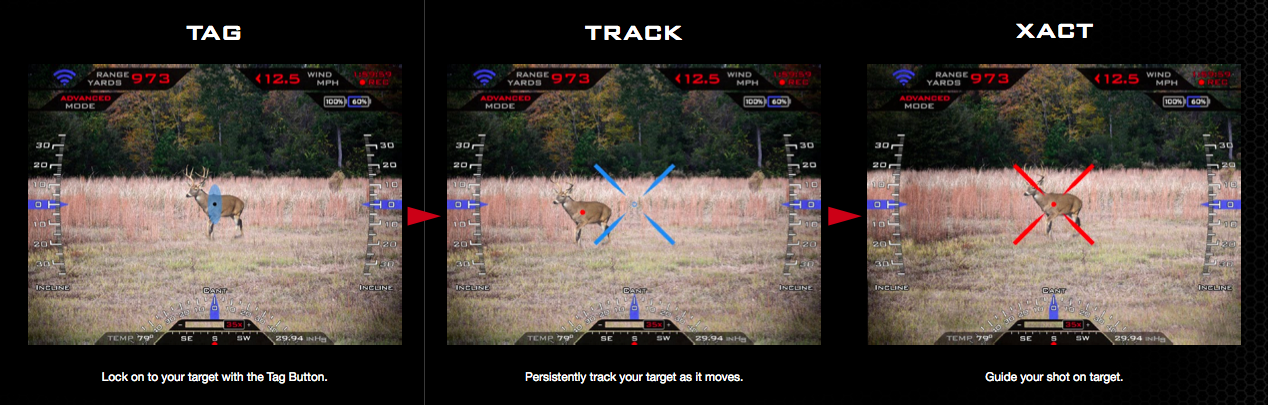
The image displayed on the scope isn't a direct visual, but rather a video image taken through the scope's objective lens. The Linux-powered scope produces a display that looks something like the heads-up display you'd see sitting in the cockpit of a fighter jet, showing the weapon's compass orientation, cant, and incline. To shoot at something, you first "mark" it using a button near the trigger. Marking a target illuminates it with the tracking scope's built-in laser, and the target gains a pip in the scope's display. When a target is marked, the tracking scope takes into account the range of the target, the ambient temperature and humidity, the age of the barrel, and a whole boatload of other parameters. It quickly reorients the display so the crosshairs in the center accurately show where the round will go.
Image recognition routines keep the pip stuck to the marked target in the scope's field of view, and at that point, you squeeze the trigger. This doesn't fire the weapon; rather, the reticle goes from blue to red, and while keeping the trigger held down, you position the reticle over the marked target's pip. As soon as they coincide, the rifle fires.
TrackingPoint is quick to emphasize the rifle doesn't fire "by itself," but rather the trigger's pull force is dynamically raised to be very high until the reticle and pip coincide, at which point the pull force is reset to its default. In this way, the shooter is still in control of the rifle's firing, and at any point prior to firing you can release the trigger. In the mockups the company had on display for the press to experiment with, the action appeared to be the same—I pulled the trigger and lined up the dots and the blue plastic toy gun went click.
Having the round fire when the shot is lined up rather than in immediate response to a trigger pull eliminates a tremendous amount of uncertainty from the shot. Even the most experienced shooters can upset a weapon's aim when pulling the trigger, and overcoming the reflex to twitch or preemptively move against a weapon's recoil is very, very difficult. By allowing the computer to choose the precise moment to take the shot, accuracy is greatly enhanced.
Putting lead accurately on targets is only part of what TrackingPoint's PGF system does. The computerized tracking scope contains some amount of nonvolatile storage, and like an airplane's "black box," it's constantly recording the visual feed from the optics. It also contains a small Wi-Fi server, and TrackingPoint offers an iOS app that connects to the scope via an ad-hoc Wi-Fi network and streams the scope's display to the app, allowing someone with an iPad or iPhone to act as a spotter. TrackingPoint notes that for novice hunters, having the ability to duplicate the scope's picture onto an external display makes it a lot easier for an experienced spotter to give advice on how and when to shoot.

Credits & Read Full Story:http://arstechnica.com/gadgets/2013/01/17000-linux-powered-rifle-brings-auto-aim-to-the-real-world/

Akaneiro: Demon Hunters enters into open beta, Linux version on the horizon


Akaneiro: Demon Hunters, the Red Riding Hood-based title from American McGee's Spicy Horse Games studio, enters into open beta today while the developer adds new tiers to its Kickstarter campaign to unlock a version for Linux.
Users can sign up to the open beta on the game's official website. It will run until Jan. 16 and consist of numerous stress tests. In addition, those who participate in the beta will have a chance to experience the game's advanced character training, weapon improvement and the in-development Shivering Pines area.
Akaneiro's Kickstarter has reached $53,589 of its $200,000 funding goal with 23 days left in its campaign. A Linux version is now added to the game's stretch goals, alongside a new penguin pet in the game's reward tiers.
Source:http://www.polygon.com/2013/1/10/3859140/akaneiro-demon-hunters-enters-into-open-beta-linux-version-on-the

Monday, January 7, 2013

Valve Console Locked For Linux, Report Suggests “SteamBox” Out 2013


After many rumours, it appears Steam’s living room console is real. At the end of 2012, German site Golem.de attended a conference, and at that conference was Ben Krasnow, Valve’s electronics engineer. Krasnow, apparently, talked hardware.
Specifically, a Valve console, which has been a joint effort with Jeri Ellsworth (for the last two years), runs off Linux, and is due in 2013.
“It doesn’t come off as a huge surprise,” says one translation from the original German source site, “considering that Valve-boss Gabe Newell views Windows 8 as a catastrophe: Steam Box will not be based on Windows, but on Linux instead.”
“This was confirmed by Ben Krasnow, one of Valve’s hardware developers, when inquired on this topic,” continues the story. “With that, the Linux client for Valve’s download and community platform Steam, which is currently in its Beta phase, gets an all new background because of this – especially as Linux will also support the big-picture mode.”
Linux might mean that the vast majority of Steam’s library won’t automatically work, but all Valve need to do is make the console launch with Half Life 3.

Source:http://www.thesixthaxis.com/2013/01/05/valve-console-locked-for-linux-report-suggests-steambox-out-2013/

Linux users resent being locked out of Windows 8


 Microsoft’s brand new version of its flagship product, the Windows operating system, has pitted it once again against Linux users who have had a longstanding battle with the giant. The Linux community has been particularly offended by the operating system’s Unified Extensible Firmware Interface (UEFI), or popularly known as Secure Boot.
The GNU Linux community’s fundamental objection to the feature is that it amounts to collusion between Microsoft and hardware manufacturers to lock users, depriving them of the freedom to install other operating systems in a Windows environment. They were later mollified by Microsoft’s clarifications that there will be a ‘Secure Boot-disable’ option on PC’s shipping with Windows 8. Although this option would have allowed installation of multiple operating systems, it is still arduous on Secure Boot machines.
Secure Boot is deemed as an attempt by Microsoft to tighten its losing grip in the desktop space and grab onto a substantial user base in the tablet space. With the release of Windows 8 and Microsoft’s tablet computer Surface, there is some clarity about the implications of Secure Boot.
As the Redmond giant provides an option for multi boot on Intel or AMD processor-based computers (seen with Windows 8), and no such option for ARM-based computers, the restriction might play out differently in the tablet market (manifested in Microsoft Surface).
It would create unhealthy competition in the long run, if Microsoft-certified ARM devices make it big in the tablet computer segment, and eliminate other operating systems from the race with a hardware lock in the form of Secure Boot.
If you have a personal computer, or a laptop that you purchased a couple of years ago, the first wake-up screen would most likely be a dull visual with a pixelated logo and text in a monotonous font with keyboard access to only a few obscure device options. This wake-up system software, that has existed from the first IBM PC, is mostly the only piece of computer ware that has never seen any major upgrades.
The Basic Input/Output System (or commonly known as the BIOS) is the firmware that initiates the device wake-up, before the operating system can be loaded.
With UEFI, this interface between the device firmware and the operating system will make the interface advanced, firstly, and more importantly, prevent malicious software that attack the BIOS (rootkits) from hampering the functioning of the operating system. The initiative of Intel and now the consortium UEFI is trying to make the boot process of computers more secure.

Secure or restricted?

Boot restrictions aren’t new in the industry. All Apple products come with restricted boot. Tablets and phones running Android too do not allow multi boot. With the Microsoft version of UEFI Secure Boot, it has joined the league of restricted boot operating systems. If Microsoft is not alone, why is it being targeted?
A blog post on Free Software Foundation website reads, “When done correctly, Secure Boot is designed to protect against malware by preventing computers from loading unauthorised binary programs when booting.” In the case of the Microsoft implementation, it hasn’t been done correctly. Making the apprehensions of Free Software crowd come true, Microsoft has now made it mandatory for ARM-based devices to have “Secure Boot” on, without an option to disable it. This means ARM-based devices certified for Windows do not have the option of booting into another operating system (unless the operating system in question is also certified by Microsoft).

Impact on market

While Free Software community and technologists who want multi boot are agitated with this ARM lock by Microsoft, from a market point of view, it does not seem like a threat, at least as yet.
Microsoft is not imposing the Secure Boot restriction in the desktop space, which is almost entirely ruled by Intel or AMD machines running Microsoft Windows. If Microsoft had imposed Secure Boot on desktop platforms, they might have faced a second antitrust action, because they are still the monopoly in personal computer operating systems.


Saturday, January 5, 2013

Linux Live USB Creator makes it easier to install Linux


There used to be a time when Microsoft Windows ruled the operating system world. But in recent years, the free and open source Linux operating system has taken a big bite out of Windows' dominance. But Linux has always had an image problem of seeming too difficult and unwieldy to install and learn, with a steep learning curve attached.
Linux Live USB Creator (LiLi for short) aims to take the sting out of a newcomer's introduction to the operating system by making it as easy as possible to get started. All you need is a USB stick with enough space—a minimum 2GB should do the trick—and five minutes of your time to install it. No user manual required.
After downloading and installing the software (developer Thibaut Lauziere also offers a portable version), open it up and you will see a simple straightforward user interface, showing the various steps needing to be completed. Once each step has been successfully carried out, the traffic light icon on the right hand side will turn green.
First, you need to point the app towards the location of your USB stick in the computer.  Secondly, you need to choose the source of the Linux installation file. For example, you may have it already downloaded onto your computer. If so, point it towards that file.
If not, you can click "download" and a big drop-down menu of various Linux distros (and some non-Linux options) will be presented as possibilities.  Just choose the one you want to download.  For newcomers, it's probably easiest to choose Ubuntu as it's an easy Linux distro to get started with.
Once you've done this, the "persistence" level should be automatically at green. "Persistence" means that you can keep your preferences and data on your USB stick, after rebooting (normally this information is discarded).
Next come LiLi's personal options, which you must decide yourself. I enabled all three options but you need to decide for yourself what you prefer.
Finally, if everything looks OK, click the yellow lightning flash to begin the installation of your chosen Linux distro to your USB stick. In my case, it took only a few minutes and it was immediately ready to go.
There are two possibilities to run your new Linux distro. The first one is to reboot your computer and let Windows boot from the USB stick. However, this means you are running only Linux with no access to Windows. The second (and preferable) option is to go to the stick and choose "Virtualize This Key," which will launch the excellent VirtualBox software.
This is the software equivalent of a sandbox where you can run software programs inside, independent of the operating system you are currently using. In other words, you can be running Windows and at the same time, have Linux running inside the VirtualBox window.
The only downside to this option is that a huge amount of CPU is going to be required to run both OS's simultaneously. So you may notice things slowing down slightly as a result. If it gets too bad, try closing some non-essential programs.
In a word, Linux Live USB Creator should be on everyone's PC, as it is essential for everyone to learn that there is a world beyond what Microsoft has to offer. With it being portable, you can easily carry it about on a USB stick and introduce Linux to everyone you know.

Source: http://www.pcworld.com/article/2023568/review-linux-live-usb-creator-makes-it-easier-to-install-linux.html

Friday, January 4, 2013

Bodhi Linux 2.2.0 ships stable E17 desktop


The latest version of Bodhi Linux now ships with the stable Enlightenment E17 desktop environment that was released recently. Bodhi Linux 2.2.0 also includes a new kernel option for 32-bit installs and has introduced hybrid ISO images. This release makes the minimal desktop distribution one of the first Linux flavours to ship the stable version of E17.
Bodhi Linux now provides two 32-bit install images: a version with a PAE-enabled kernel for machines exceeding 4GB of RAM and an image that uses a non-PAE kernel. Like the 64-bit image, the PAE-enabled 32-bit ISO uses a Linux 3.7 kernel while the non-PAE image provides an older 3.2 kernel. All images are now hybrid ISOs, meaning that they can be copied to USB memory sticks with a simple dd command and can be easily burned to CDs as well. The documentation for the distribution has also been updated and the desktop profiles have been reworked for the final release of E17. These provide several different desktop layouts – from a barebones setup to tiling window management and a complete composited desktop.
Bodhi Linux 2.2.0 is available for 32-bit and 64-bit x86 systems as well as ARM devices such as the Raspberry Pi, Nexus 7 and others. These images can be downloaded from Sourceforge. At the time of writing, packages on the Bodhi Linux web site had not been updated. Users of the 2.x branch of the distribution can update their systems through their package manager.

Source:http://www.h-online.com/open/news/item/Bodhi-Linux-2-2-0-ships-stable-E17-desktop-1777022.html

Samsung: Tizen Linux phones will arrive in 2013

Hard on the heels of Wednesday's unveiling of Ubuntu Linux for phones, Samsung has now reportedly confirmed that it plans to ship new Linux-based mobile devices of its own later this year. 

Rather than Ubuntu Linux or Linux-based Android, however, Samsung's handsets will be based on Tizen Linux, a mobile OS that was launched by the Linux Foundation and the LiMo Foundation in late 2011.

Samsung plans "to unveil competitive Tizen devices within this year," a company spokesperson reportedly told CNET on Thursday, though no further specifics were provided.

Source:http://www.pcworld.com/article/2023649/samsung-tizen-linux-phones-will-arrive-in-2013.html

Friday, December 28, 2012

Download Shim


Secure Boot bootloader for distributions available now

Download Here:


http://www.codon.org.uk/~mjg59/shim-signed/

Linux (slowly) comes to Windows 8 PCs with UEFI secure boot


One of the largest underlying changes to Windows 8 is the long-overdue shift from BIOS to UEFI. UEFI (Unified Extensible Firmware Interface) is superior to BIOS (Basic Input/Output System) in almost every way, except for one: At the moment, UEFI prevents Linux distributions from being installed on Windows 8 machines.
UEFI, in essence, is a light-weight operating system that your computer loads at boot time. (See: Demystifying UEFI, the long-overdue BIOS replacement.) Because it’s an operating system, UEFI has full access to your hardware, and it can be programmed to do just about anything (thus the Extensible part of its acronym). UEFI interfaces can be mouse-driven (pictured below), and can perform complex tasks such as surfing the web or backing up your hard drives.
The UEFI specification itself also introduces a few new features to improve performance, flexibility, and security. The feature that has received by far the most attention is secure boot, as it can be used by PC OEMs to prevent other operating systems being installed on their hardware. Dell, if it so wishes, could build a PC that only runs Windows. On the flip side, Apple could stop Windows from being installed on its hardware.
Asus EFI BIOSOstensibly, secure boot isn’t meant to be used maliciously, though: Its primary purpose is to prevent a malware-infected PC from booting, thus protecting the user from possible data theft or worse. Secure boot works by means of cryptographic signing: A chip on the motherboard stores the cryptographic hash/key of important operating system files and drivers, and during boot-up those files are checked — if their hashes have changed, they’re assumed to be compromised, and the boot process stops. If you try to boot Linux, secure boot detects the altered hashes and halts boot. While Linux obviously isn’t malware, secure boot doesn’t know that.
The solution, of course, is to add the Linux file/driver hashes to the secure boot chip — but to do that, you need a secret password. In the case of Windows 8 machines (i.e. official OEM machines bearing the Windows 8 logo), only Microsoft and the OEM know the password. If the key was public, then malware authors would be able to add their own hashes, and thus the system would be worthless.
Changing the secure boot setting, in BIOSWhere does this leave Linux? One solution is to simply disable secure boot. Some OEM machines allow you to do this, while some (most notably the ARM-powered Windows RT devices) don’t. This is a bit of an unfair compromise, though, as it leaves your computer vulnerable to malware and rootkit infection. Another option would be for Linux distributors, such as Red Hat and Canonical, to collaborate with Microsoft to get their distros added to the secure boot system. It doesn’t seem like there has been much movement in that area, though.
The currently favored solution is a workaround: a pre-bootloader signed by Microsoft (so it passes secure boot) that can then be used to load a normal Linux bootloader without further signature checking. One Linux developer, Matthew Garrett, has managed to get Microsoft to sign a pre-bootloader called Shim. You can download it today and use it to boot Linux on your Windows 8 machine. Shim should soon find its way into SUSE, Fedora, Ubuntu, and other major Linux distros. The Linux Foundation is developing an “official” workaround, but as of November it still hadn’t received Microsoft’s blessing.

Source:http://www.extremetech.com/computing/144204-linux-slowly-comes-to-windows-8-pcs-with-uefi-secure-boot

Thursday, December 27, 2012

Linux tablet ?


The year of the Linux tablet is, like the year of the Linux desktop, destined never to arrive.
That doesn't mean we won't see Linux on a tablet, but you'll see Linux on a tablet the way you see it on the desktop - clinging to a tiny percentage of the market.
There is of course Android, which does use a Linux kernel somewhere under all that Java, but when Canonical or Red Hat talk about building Linux tablets, obviously Android is not what they have in mind.
For most, the dream of a Linux tablet means running a distro like Ubuntu, Mint or Fedora on some sort of tablet hardware.
Indeed, intrepid users have already hacked Linux onto Android tablets. But the first shipping Linux tablet looks like it will be the $99 "PengPod," a Frankentablet that will run both Android and Linux proper. The PengPod will, assuming its creators follow through with their plans, arrive in buyers' hands in January of 2013.
Unfortunately, the PengPod seems doomed to mediocrity. The PengPod was funded through the Kickstarter-like site Indiegogo that ensures a market, no matter how small, does exist. But the device itself looks like little more than an off-brand Android tablet with Linux running from a micro SD card. There is also an option to have Linux pre-installed on the internal flash, but those aren't shipping right away.


The PengPod may well satisfy the enthusiasts who backed it, but it's hardly going to make a flagship example of Linux excellence in a brand new form factor.
In fact the best evidence that there's never going to be a year of the Linux tablet is that it doesn't even look like there's going to be a year of the Windows tablet.
Microsoft's Surface tablet effort is not, according to early numbers and a plethora of anecdotal evidence, flying off the shelves and hardware manufacturers don't seem to be rushing out the Windows 8 tablets.
So far, despite Microsoft's best efforts, the tablet world is still very much orbiting the twin stars of iOS and Android.
Having used a Samsung Windows 8 tablet for a few months, I have a theory as to why: you think you want a full desktop computer on your tablet - I certainly did -- but you don't. It simply doesn't work.
In the case of Windows 8 you can blame some of the "not working" on the buggy, incomplete software that is Windows 8, but not all of the problems can be attributed to a shortcoming of touch APIs.
Much of what makes a full desktop interface terrible on a touch screen tablet is simply the whole desktop paradigm was never designed to be used on a tablet and it shows. The Metro interface for Windows 8 is excellent; different, but in my experience really well done.
Where Windows 8 on a tablet falls apart is when you try to bring the software keyboard to the traditional desktop interface on a tablet. The software keyboard takes up half the screen, which makes even simple tasks difficult. How to you rename a file and move it? First you tap it to select it, then you tap the button to bring up the keyboard, then you type, then you touch away the keyboard, then you touch the file again. It isn't just awkward and slow; it's downright antagonizing.

Read Full Story: http://www.theregister.co.uk/2012/12/26/year_of_the_linux_tablet/

Tuesday, December 25, 2012

Linux Mint 14 (Nadia) and Linux Mint Debian Edition-Christmas Mint


The elves in the Linux Mint development team have been very busy the past few weeks, and just in time for Christmas they have produced new and updated relases for all of the Mint distributions.
The main branch, Mint 14 (Nadia), derived from Ubuntu 12.10 with the Gnome-based Cinnamon and MATE desktops came out in November, then Linux Mint Debian Edition Update Pack 6 at the beginning of December.
That was followed last week by the release of the Xfce version, and the set was completed this weekend with the release of the KDE version. In the following gallery I will show the default desktop and menus, and give a brief description of the content and some of strengths of each version. But there is no substitute for trying it for yourself.
All of these distributions are "Live" images, so you can download and burn them to a DVD or copy them to a USB stick, and boot it up on your own computer without changing anything on your disk. Running the live image you can see whether all of your hardware is supported - don't believe all of the FUD that people spout about having to find device drivers, compile kernel modules or whatever.
The screenshots in this gallery were taken on six different laptops, with a variety of Intel and AMD cpu and graphics, and Wi-Fi adapters from Intel, Broadcom, Atheros and Ralink - and they all worked from the base installation. If the live distribution works for you, the Mint installer will help you get it installed on your system alongside Windows.

Credits:http://www.zdnet.com/linux-round-up-a-bunch-of-mints-for-christmas-7000009158/

Monday, December 24, 2012

How to easily install the very latest GNOME in any Distro with JHBuild


The point for having an upstream GNOME installation built from sources is if you are going to build an extension, a theme or a GTK App and take advantage of all the new features of next GNOME. However it is also useful if you want to help GNOME to get better by submitting bugs  ..or it could be useful if you are just curious to see what’s coming next :)
The tool for building GNOME is nothing else than JHBuild. 

Intro

I am not going to write a full guide for how to install GNOME with JHBuild by just giving some commands, instead I will explain some basic points and then you can check on the official documentation before you start building. So this is just a quick intro and doesn’t explain all possibilities of JHBuild tool.

What JHBuild is?

JHBuild is a small application/tool, that helps us to install software from sources by setting a sandboxed environment. It also handles every dependency of the software we want to build by downloading it, configuring it, building it and installing it.
JHBuild is part of freedesktop.org and started for GNOME, but today many applications provide JHBuild modulesets. In this tutorial we just get bother only with building GNOME.

Will JHBuild brake my system?

Absolute no! JHBuild will use an isolated from the rest of your system installation similar to NPM and RVM. However it can mess up with your Apps configuration files. For example if you build Gimp with JHBuild and you have also Gimp distributor package, both installation will use the same configs.
You can easily avoid that, by using a different account just for running latest GNOME.

How much time will take to build GNOME?

It depends from your connections and your system! A typical installation (in my case) includes Gnome-Shell, Gnome-Control-Center, Empathy and Gnome Themes ..plus all their dependencies. That means downloading and building around 120 packages from GIT. With my ~7Mbps connection and and an Intel Ivy Bridge i5, it takes approximately 3-4hours and it uses around 6-7GB of space.
However there is not need to staring at it, right? Updating is much faster.
Read More:http://worldofgnome.org/how-to-easily-install-the-very-latest-gnome-in-any-distro-with-jhbuild/

Sunday, December 23, 2012

Linux 3.8's features staked out


Linus Torvalds has announced the first pre-release version of Linux 3.8, releasing it on the "longest night of the year". As previously reported, it includes support for the Flash-Friendly File System (F2FS), which has been designed for use on flash storage devices such as USB flash drives, memory cards, and internal storage in devices such as cameras, tablets and smartphones.
The developers have also merged a number of basic core functions developed under the "balancenuma" name. These are aimed at enabling future kernels to automatically keep processes and the memory areas they are using in close proximity. This is important for optimum performance on today's popular multiprocessor systems with NUMA (Non-Uniform Memory Access). Further improvements likely to be merged in Linux 3.9 and later versions will significantly improve this automated placement and will build on the foundations merged in 3.8.
Code for a "huge zero page", which can reduce memory usage in some setups, has also been merged. The kmem extension for the "memory" cgroup controller can now be used to limit the memory used by the kernel for processes in a group. Appropriately configuring these limits enables the kernel to keep the lid on any fork bombs run from the shell.
The addition of inline data support means that the Ext4 filesystem is now able to store very small files together with the inode entry, thereby saving storage space. The kernel has also been given a simple driver for the graphics cores on NVIDIA's Tegra family of SoCs (system-on-a-chip). The code for using the acceleration functionality offered by these chips, which is being co-developed by NVIDIA, has, however, not yet made it into the kernel. To simplify maintenance and ongoing development, the kernel developers have removed support for Intel 386 and related CPUs. 486 and other x86-32 processors will continue to be supported.
This is, as usual, the first release of the new version of Linux, coming after the closing of the "merge window" where the majority of the changes for the new version are merged into the main development branch of Linux. The next phase, the stabilisation phase, will mostly include corrections and fixes to the new features and any regressions that appear as developers test the new kernel. Details of these and many other changes will as ever be provided by The H's Kernel Log. Assuming the kernel developers keep to their usual tempo, Linux 3.8 is likely to be released in mid-February.

Source:http://www.h-online.com/open/news/item/Linux-3-8-s-features-staked-out-1774113.html